Intuit Connect 2026 is a wrap! 
Watch the replay and catch up on the highlights.
Empowering your accounting Practice: Embracing Intuit’s ProPartner program.
ProPartner

Empowering your accounting Practice: Embracing Intuit’s ProPartner program

Intuit ProPartner Accountants is the partner program launching in early 2027 to succeed the ProAdvisor Program. It lives inside Intuit Accountant Suite as part of the team management tools, providing benefits, education, and resources for your staff.

Since Intuit has several articles about the ProPartner program already, I’m not going to rehash the basics here; I would rather focus on what the program means to you and your firm. To learn how the program works, check out this ProPartner program guide.

A matter of scale

The new program is fundamentally the same as before, except in scale. There are five tiers instead of four, with new benefits that enhance our visibility and celebrate our expertise.

Many of the changes in the program address the evolution of our industry. Tax practices are adding client advisory services (CAS) departments, and private equity is rapidly consolidating accounting firms. Operating at scale means that the ProAdvisor tiers had become top-heavy. While QuickBooks was originally designed for small business owners and the bookkeepers who love them, the growing needs of larger organizations are leading to the addition of the fifth Elite tier and development of new brand practice management tools such as the new Books Close and Client Insights.

The first tier of the ProPartner program, the Member level, is for those who sign up for an Intuit Accountant Suite portal, but have no certifications and no clients. As soon as you pass one certification exam and have one client, you become a Partner and your benefits start.

To illustrate how different the programs are: Under the ProAdvisor Program, it took 7,000 points to get to Elite; under the ProPartner program it will take 1,000.

In the previous program, it was possible to be a Gold ProAdvisor just by passing all the certification exams, even if you didn’t have a single client. Now, working your way up the tiers requires you to provide actual CAS. I believe that elevates the quality of the practitioners earning the ProPartner designation. Experience matters.

What’s the benefit?

The benefits are much improved. While the first tier, Member, only can use QuickBooks Ledger, all the other tiers still get free QuickBooks Advanced with Workforce Elite Payroll. We still get discounted QuickBooks Payments, Mailchimp, and Intuit ProConnect Tax returns. We still get marketing guides and your Find-a-ProAdvisor [soon to be ProPartner] listing. 

Improvements include a new client referrals program and a 3-year revenue share that scales as you move up the tiers. There’s even an awards program and the opportunity to become an Industry Advisor, providing guidance to high school and college students curious about entering the profession.

And if you hit the top two ProPartner levels, Premier and Elite, the new Accelerate tools are free, allowing you to manage your team and clients at scale. This makes sense, since it takes having a team and a solid client roster to earn these designations.

Calculating your ProPartner tier

This is a good time to migrate to Intuit Accountant Suite, if you haven’t already, so that you know what to expect out of your own transition to ProPartner. To make the switch, simply head up to the Settings gear and click the shiny green button. The process is quick and seamless, and now your user interface will match the one your clients have had for a year.

Once you’ve updated, head to the Firm Hub > ProAdvisor > Benefits, then click the Learn More button at the top of the page. The ProPartner status displays your projected tier with your points calculation.
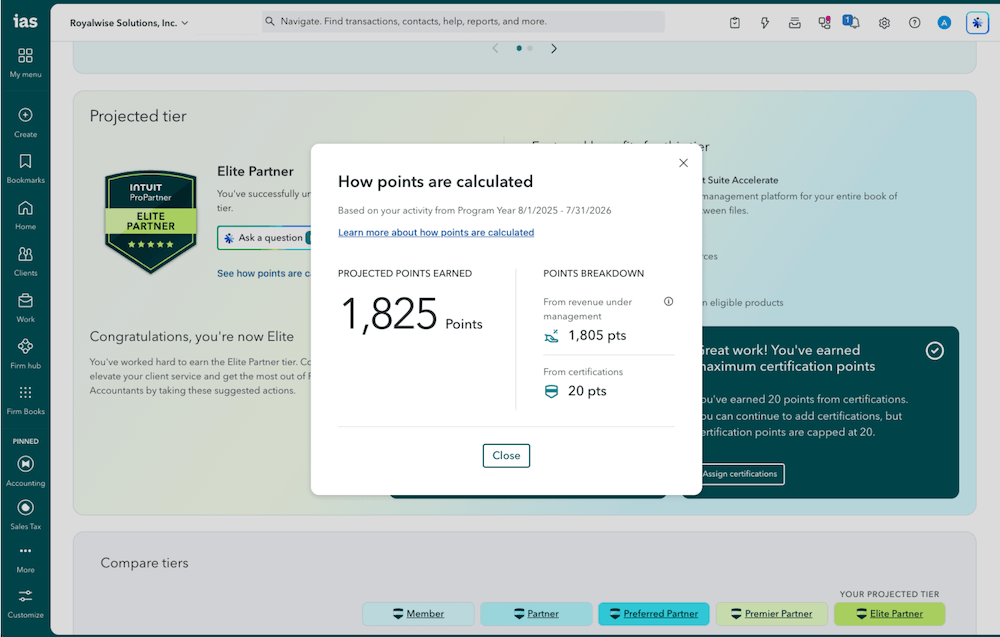
Partner portal dashboard with points calculation popup.

Points are earned by “Revenue Under Management (RUM),” which basically means that the more clients you have and the higher subscription levels they have, the more points you’ll have. They’re calculated on the first of the month based on the month in arrears.

We earn one point for every $100 in total monthly spend for your firm and all of your clients. We also earn up to 20 points for passing up to four of the certification exams at 5 points each.

In the new scale, it only takes 50 points to get to Preferred Partner that has the dedicated support phone line we all covet. After you’ve passed your certifications and received your 20 points, it only takes 30 more points to get to the Preferred Partner level. That means your practice will need to generate $3,000/month in QuickBooks service revenue, including QuickBooks subscription fees, Workforce payroll, QuickBooks Time, and QuickBooks Bill Pay.

With some quick-and-dirty math, that averages to roughly 36 Essential clients, 22 Plus clients, nine Advanced clients, or managing two Intuit Enterprise Suite accounts. That’s without factoring in your clients’ Workforce Payroll, Time, or Bill Pay subscriptions.

As soon as you earn enough points, you move up a tier and stay there. At the end of the program year on July 31, you’ll be assessed to see whether you stay in that tier or go down again.

The points are earned by the realm ID of the attached Accountant User. If you are a Team member of that firm, you receive the firm’s benefits while working on that firm’s clients. If the firm has Elite phone support, you also get that level of phone support.

If you work for a firm and also have your own clients, you still have your own independent standing based on your own clients in your own console.

While it’s easy to dismiss the new points system with a cynical “They just want us to sell more product,” I disagree. The more clients you have, the more experience you have and the more reward you deserve. Clients with more complexity require higher subscriptions. While the scale is based on revenue, the points are representative of your expertise.

Looking ahead

Once you know if you’re a Partner, Preferred, Premier, or Elite, check out the benefits, decide which ones are relevant to you, and plan ahead. As I look at the rewards, most of them fall under “nice to have,” including increased revenue share. But the only one that truly matters on a practical daily basis, in my eyes, is the dedicated phone support line, and that’s available at the Preferred level.

My personal perspective is, as Spock says, that “The needs of the many outweigh the needs of the few.” I would like to see longevity awarded 5 points a year. Independent bookkeepers with boutique lifestyle practices serving microbusinesses, many of whom have been dedicated to QuickBooks Online for well over a decade, should also have a path to Preferred.

So, what do you do if your predicted tier is lower than you would like? 

  • First, make sure you have the four available certifications: QuickBooks Online Levels 1 & 2, Workforce payroll, and Intuit Enterprise Suite. The Desktop certification is being retired, although the training courses remain. Certification exams are low-hanging fruit. If you know what you’re doing, you can test out of the certifications without spending hours on the trainings. And if you don’t have enough knowledge to pass the exams without the training program, then you’re exactly where you need to be, and moving up the tiers will happen in your future.
  • Next, consolidate your consoles. If you have more than one QuickBooks Online Accountants realm, move all your clients together under one login. There’s a Client Transfer tool specifically for this purpose.
  • Finally, look at your client list with fresh eyes. If you’ve gotten into a reconciliation-close routine and dismissed QuickBooks Online notifications as “upsell ads,” it just may be that you have an opportunity to actually steer your client into better business solutions.

There are client-specific product recommendations on your Intuit Accountant Suite home screen, and in the Subscriptions and Billing section under the Settings gear. Get up to speed on the multitude of new features that have been released during the last 24 months that may address your clients’ pain points:

  • A few of your clients have grown over the years; upgrading to Plus and starting to use Classes will help them better analyze their new revenue streams.
  • Maybe they’re still writing checks, so turning on Bill Pay would allow them to stop having to wait for signatures. 
  • Maybe clients are cash-based, but they really should look to accrual because they have a lot of fixed assets, prepaid expenses, and annual lump-sum customer payments that should be recognized monthly. These are all features in QuickBooks Advanced.
  • Maybe setting up Bill Approval Workflows using Bill Pay subscriptions will prevent fraud from receipts emailed by bad actors.
  • Don’t forget that the AI features scale with each edition. By the time you reach QuickBooks Advanced, you can ask Intuit Intelligence to perform financial analysis about everything from cost leaks to exit strategies.

“Selling more for Intuit?” You could look at it that way, or you can see yourself as your clients’ hero in saving them time, uncovering new revenue streams, keeping them safe, and meeting their goals. 

In addition to upgrading their software feature set, this is an opportunity to review your engagement terms and increase your own bottom line by offering clients new services. 

That’s what makes you an Elite ProPartner, in more ways than one.

Editor's note: Alicia has been taking deep dives into Intuit Accountant Suite in The Unofficial QuickBooks Accountants Podcast, in her AI in QBO class, and in her upcoming Intuit Accountant Suite class.


Recommended for you

Get the latest to your inbox

Get the latest product updates and certification news to help you grow your practice.

Looking for something else?

Get QuickBooks

Smart features made for your business. We've got you covered.

Tax Pro Center

Expert advice and resources for today’s accounting professionals.

QuickBooks Support

Get help with QuickBooks. Find articles, video tutorials, and more.

How can we help?
Talk to sales 1-800-497-1712

Monday - Friday, 5 AM to 6 PM PT

Get product support